Automatic Monthly Invoicing
Every client invoiced, sent and logged on the same day each month, untouched.
Confidential: professional services client
- Client A Sent
- Client B Sent
- Client C Sent
- Client D Sent
Once a month, the system sends every client their invoice on its own. Nobody has to remember, type or click.
What changed for this client
The same monthly job, before and after we automated it.
- Someone sat down at the start of every month and built each invoice one by one.
- Extras on top of a client's plan were added from memory, so line items got missed.
- The spreadsheet, the emails and the invoices could easily disagree with each other.
- Invoices go out on the same day every month, with no one involved.
- Extras are added every time, because the system decides, not a person.
- The spreadsheet always shows who has been billed, so nothing is checked twice.
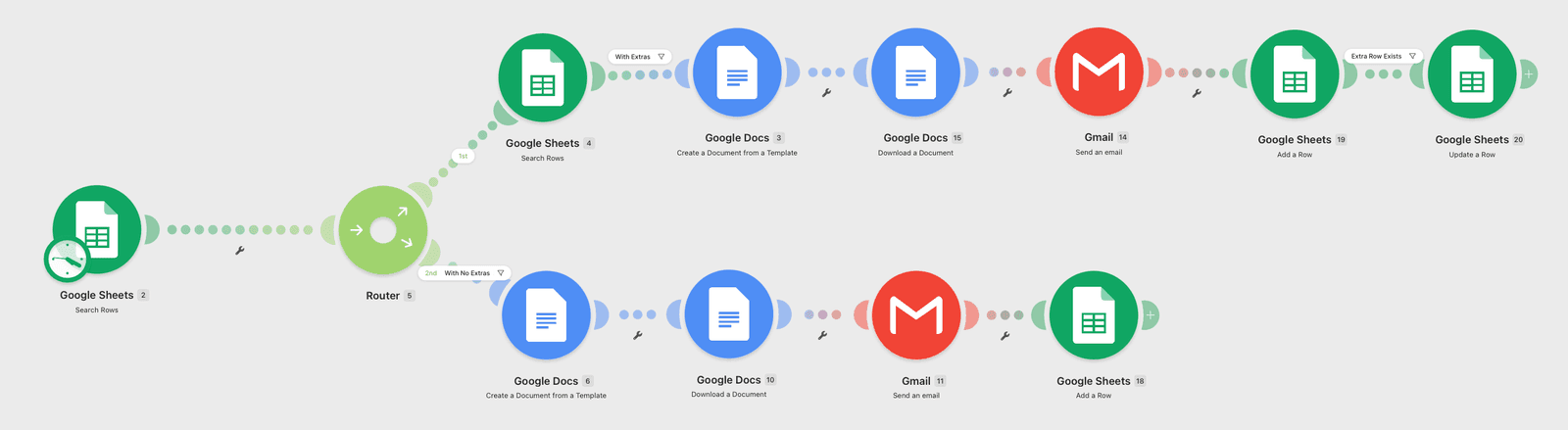
Six small steps, all automatic
Scroll down to follow one invoice from start to finish.
- Step 1
It wakes up on its own
On the same day every month, the system starts. No reminder needed.
- Step 2
It checks your client list
It reads a simple spreadsheet to see who is due to be billed this month.
- Step 3
It picks the right invoice
Clients with extras get an invoice that includes them. Everyone else gets the standard one.
- Step 4
It writes the invoice
Each client's details are filled into your invoice template and saved as a ready-to-send file.
- Step 5
It emails the client
The invoice is sent straight from your Gmail, so it looks like it came from you.
- Step 6
It ticks them off
The spreadsheet is updated, so no client is ever billed twice in the same month.
You probably already have everything it needs
No new software to learn. We connect the tools you already use.
A client spreadsheet
The list you probably already keep: who your clients are, what they pay, and whether they have extras.
Your invoice template
The document you already send. We reuse it, so invoices look exactly as they do today.
Your Gmail account
So invoices are sent from your own address and appear in your sent folder.
How we set it up for you
- 1
We talk it through
You walk us through how you invoice today, including the odd exceptions.
- 2
We build and test it
We run it on dummy clients first, so nothing reaches a real inbox until it is right.
- 3
We switch it on
On the first real run you simply check that it went out. After that, you can forget about it.
If it repeats, it can usually be automated
Subscriptions and retainers
Monthly fees that are the same every cycle.
Rent and membership fees
Anything that repeats on a fixed date.
Add-on pricing
Base plans with extras that are easy to forget.
Anything in a spreadsheet
If you already track it there, the manual steps around it can go.
Got a repetitive process eating your week?
Let's automate it